Stripe Terminal 20+ Countries

WisePad 3

Portable Bluetooth reader with built-in PIN pad - available internationally

Bluetooth
Connection
20+
Countries
PIN pad
Built-in
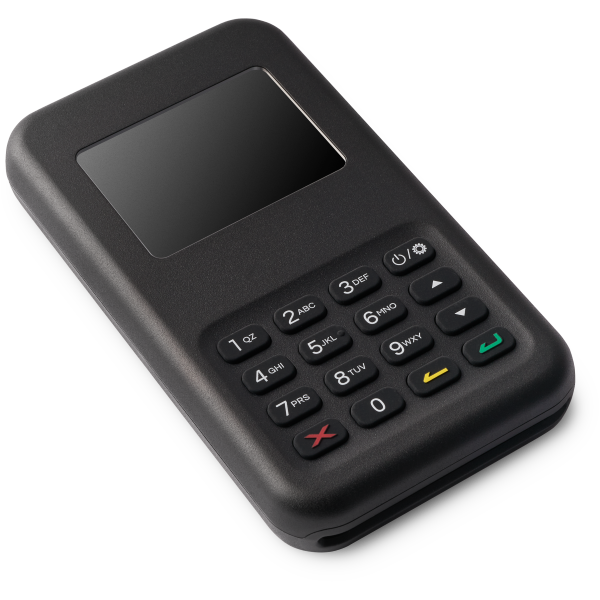
WisePad 3

Built for your workflow

Widest Availability

Available in more countries than any other Stripe Terminal reader. The go-to choice for international businesses.

Bluetooth Portable

Connects wirelessly to your phone or tablet. Take payments at markets, events, or client locations without cables.

Built-in PIN Pad

Integrated keypad for PIN entry - required in many countries for chip card transactions. Meets local compliance.

Technical specifications

ConnectivityBluetooth
DisplayLCD with keypad
Card typesChip, Contactless (NFC), Magstripe
PlatformsiOS and Android
AvailabilityAU, AT, BE, CA, CZ, DK, EE, FI, FR, DE, IE, IT, LV, LT, LU, NL, NZ, NO, PL, PT, SG, SK, SI, ES, SE, CH, GB, US and more

Get started in minutes

1
Get Flow POS

Download Flow POS from the App Store or Google Play. Apple silicon Mac users can install the iOS app from the App Store for supported workflows.

2
Connect Stripe

Sign in with your Stripe account using secure OAuth. No API keys needed.

3
Order your WisePad 3

Purchase the WisePad 3 from your Stripe Dashboard. Available in most Stripe Terminal countries.

4
Pair via Bluetooth

Turn on the reader and pair it with your device through Flow POS settings.

Common questions

The WisePad 3 has a built-in PIN pad and LCD display, making it suitable for countries where PIN entry is required. It's also available in 20+ countries, while the M2 is US-only.

Not yet. Flow POS currently requires an active internet connection for WisePad 3 payments. Stripe Terminal supports offline features for some reader/platform combinations, but Flow POS does not expose offline mode yet.

The WisePad 3 offers all-day battery life for a typical day of transactions. A full charge typically lasts several hundred transactions.

Many countries outside the US require PIN entry for chip card transactions. The WisePad 3's built-in keypad ensures you can accept these payments without issues.

Other card readers

Get the App

Flow POS for iOS, Android, and macOS

Download Flow POS from the App Store or Google Play. Apple silicon Mac users can install the iOS app from the App Store and use supported Flow POS workflows on macOS.

Works with your existing Stripe account 1% Flow POS fee on successful payments iOS, Android, and Apple silicon Mac support